
first_use
This is an old revision of the document!
GUI First Use.
In a Browser enter http://<your docker server>:<the avadroid mapped port>
Example: http://192.168.1.10:18001, as per previous examples.
Click Login the default password is: corradecontrol . This will take you to the “Dash Board”,
- Click “Home” in the Navigation SideBar then change password.
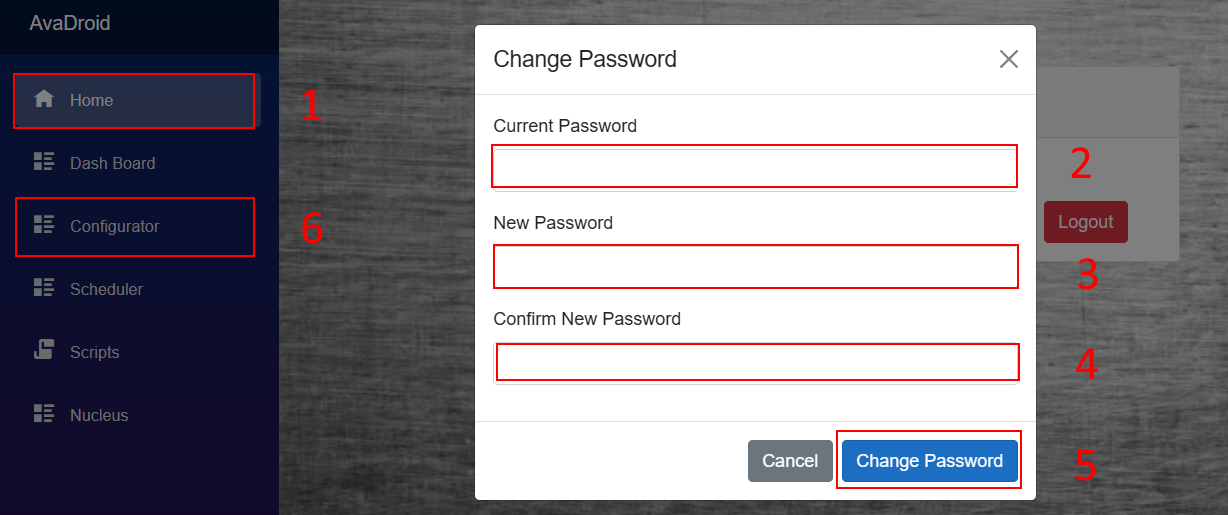
- Enter the current password (corradecontrol if default)
- Enter your new password
- Enter your new password again.
- Then click on change password
- You will be returned to the Home screen, click on Configurator in the Navigation SideBar.


- From your AvaDroid's Second Life Profile, Cut the UUID (on Firestorm, if you are not logged in as your AvaDroid, you can click on the cog icon, bottom right of the AvaDroid's profile, then copy UUID) and paste in the box overwriting what is there.
- Put in the first name and second name(s) of your AvaDroid, Typically these will be the Display Name. The first name should match the <name> used previously, but it doesn't have to. The first name will be how the AvaDroid is addressed. If someone looks at the AvaDroids Display Name, sees “Anne Ode” the may sey “Hello Anne”. The AvaDroid recognises this name and respond
DO NOT USE FANCY CHARACTERS.
Age and Gender, set as you see fit. These are self awareness items.
ollama run llama2-uncensored
first_use.1767083771.txt.gz · Last modified: by robyn