
first_use
This is an old revision of the document!
GUI First Use.
In a Browser enter http://<your docker server>:<the avadroid mapped port>
Example: http://192.168.1.10:18001, as per previous examples.
Click Login the default password is: corradecontrol . This will take you to the “Dash Board”,
- Click “Home” in the Navigation SideBar then change password.
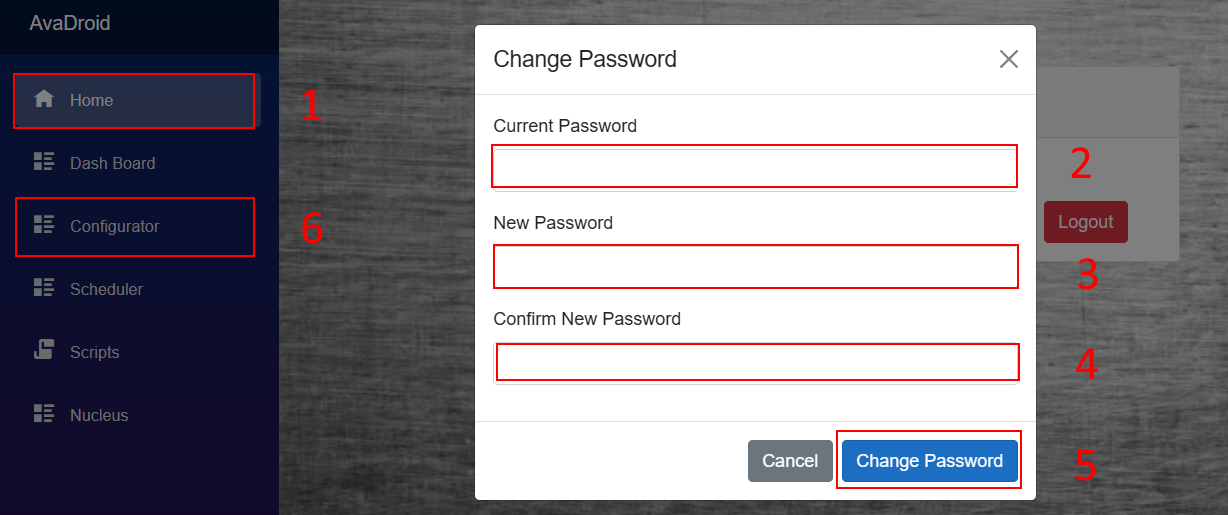
- Enter the current password (corradecontrol if default)
- Enter your new password
- Enter your new password again.
- Then click on change password
- You will be returned to the Home screen, click on Configurator in the Navigation SideBar.

first_use.1767080511.txt.gz · Last modified: by robyn